Architecture as code with SysML v2
No heavyweight modeling tool, no need to draw: you keep your SysML v2 model as text in Git, and PRISM generates every view with one command – flows, structures, allocations, traceability. Readable for everyone in the browser.
PRISM in 90 seconds
How it works
No migration project, no training: PRISM reads the text you already have and writes back only checked, standard SysML v2.
Point PRISM at the folder with your .sysml files, versioned in Git like source code. An optional project profile states what your metadata means, such as «function» or «unit».
PRISM generates action flows with swimlanes, structure diagrams with ports, allocations, requirement landscapes and traceability. The layout happens automatically; you only move what you want placed differently.
Stakeholders open the views in the browser or as a single HTML file. Changes go through the diagram, the text editor or the AI assistant – always as a checked text change with undo and a commit on click.
Simple and correct
Good tools take work off your hands without lowering the bar: PRISM keeps the handling lean and still lets no broken SysML v2 into your model.
No training marathon, no tool landscape.
Focus on the essentials. SysML v2 is a powerful language – PRISM sticks to its core concepts, usable without deep language expertise. The model remains standard SysML v2, so it is tied to no tool.
Text instead of pushing boxes. You write the model; the layout happens automatically.
One command, every view. Reading happens in the browser – no installation, no modeling-tool licence.
Edit where it suits you: in the diagram, in the details panel, in the text or by chat in plain language.
Conventions come along. New elements take over the short-name numbering, metadata and spelling of their siblings.
Nothing is final. Every change can be undone, even after a reload or restart; commits only happen on click.
What PRISM writes is valid standard SysML v2.
Stays standard. Your model is and stays SysML v2 as the OMG defines it – readable by any tool that understands SysML v2.
Errors stay out of the model. Every change is checked before it is saved – from the diagram, the text or the AI assistant.
See mistakes at once. Typos and unsuitable values are flagged while you work.
Completeness at a glance. Model health shows at any time which requirement is still open and which function has no part to run on.
Rename without risk. PRISM updates every reference and shows them to you first.
Real screenshots from PRISM – no mock-ups, no retouching.
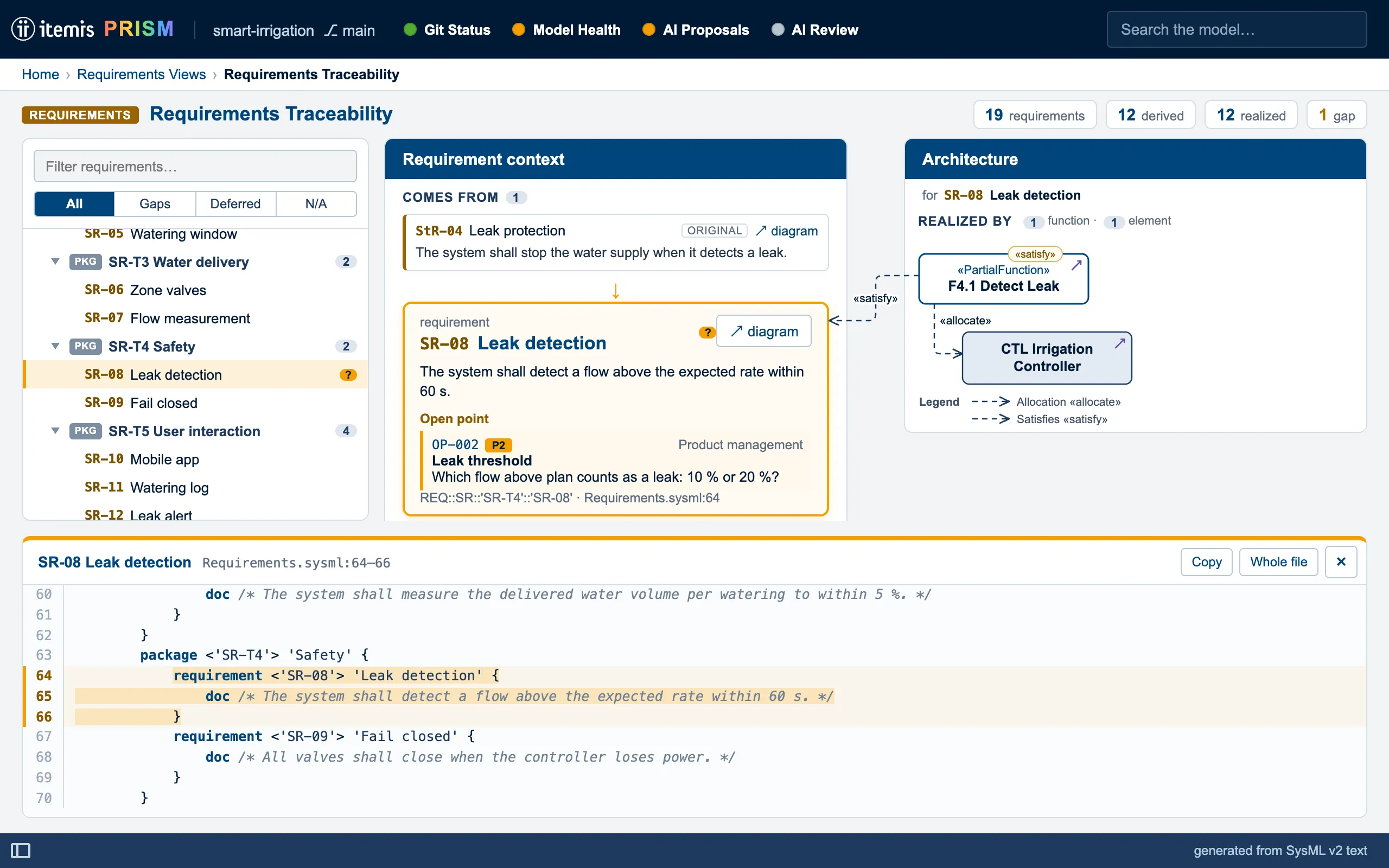
The home page sorts every view into architecture, allocation and requirements and shows which stakeholder views are ready, in progress or planned. Four status lights report Git status, model health, open AI proposals and the last AI review.
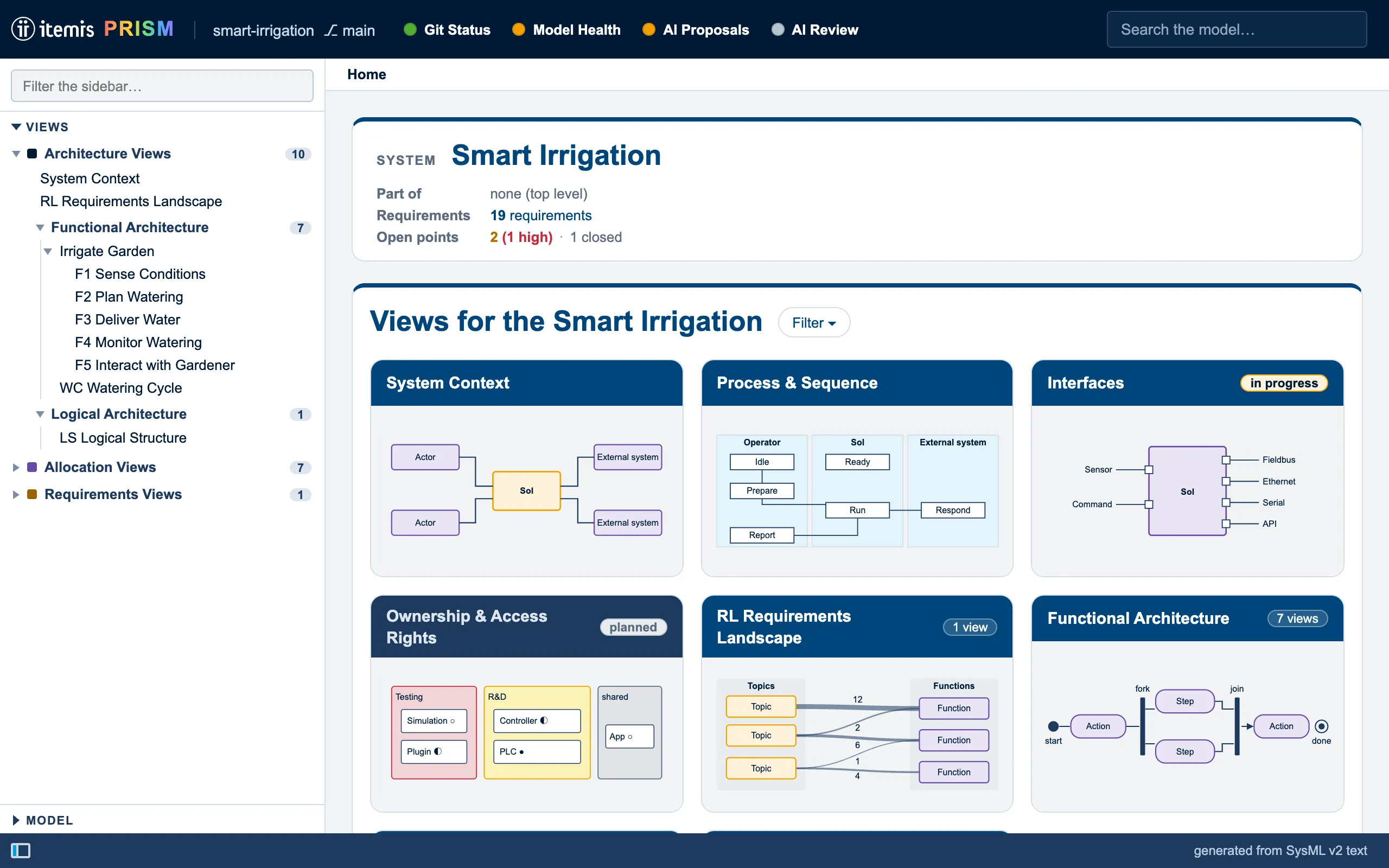
Allocate steps to a part with allocate, and PRISM draws one lane per performing part. Steps allocated to nothing end up in a lane of their own – gaps in the model show at once.
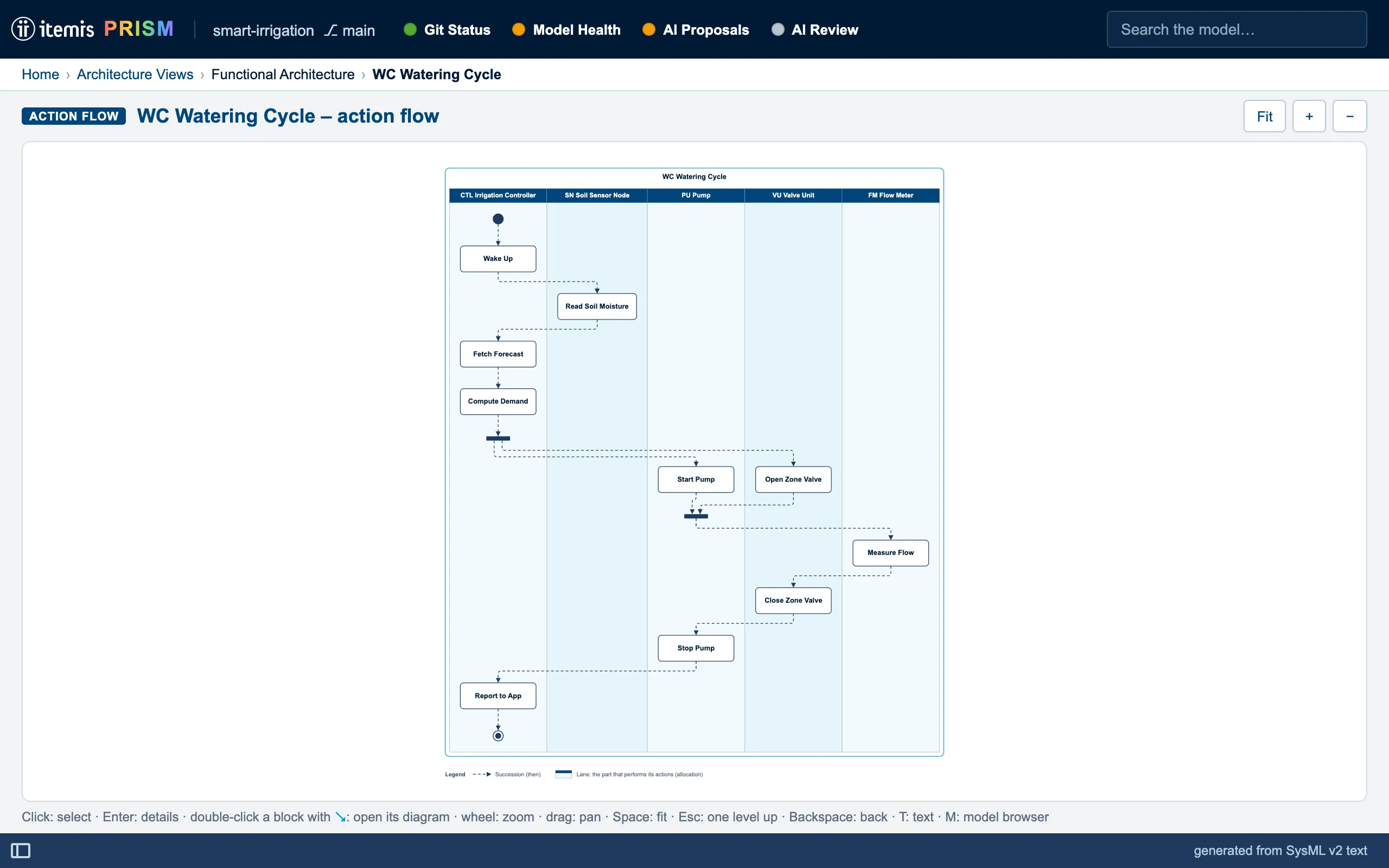
The requirements landscape bundles derivations and satisfy relationships between topics into strands whose width is their number. Project leads and architects see in one picture where coverage is solid and where it is thin.
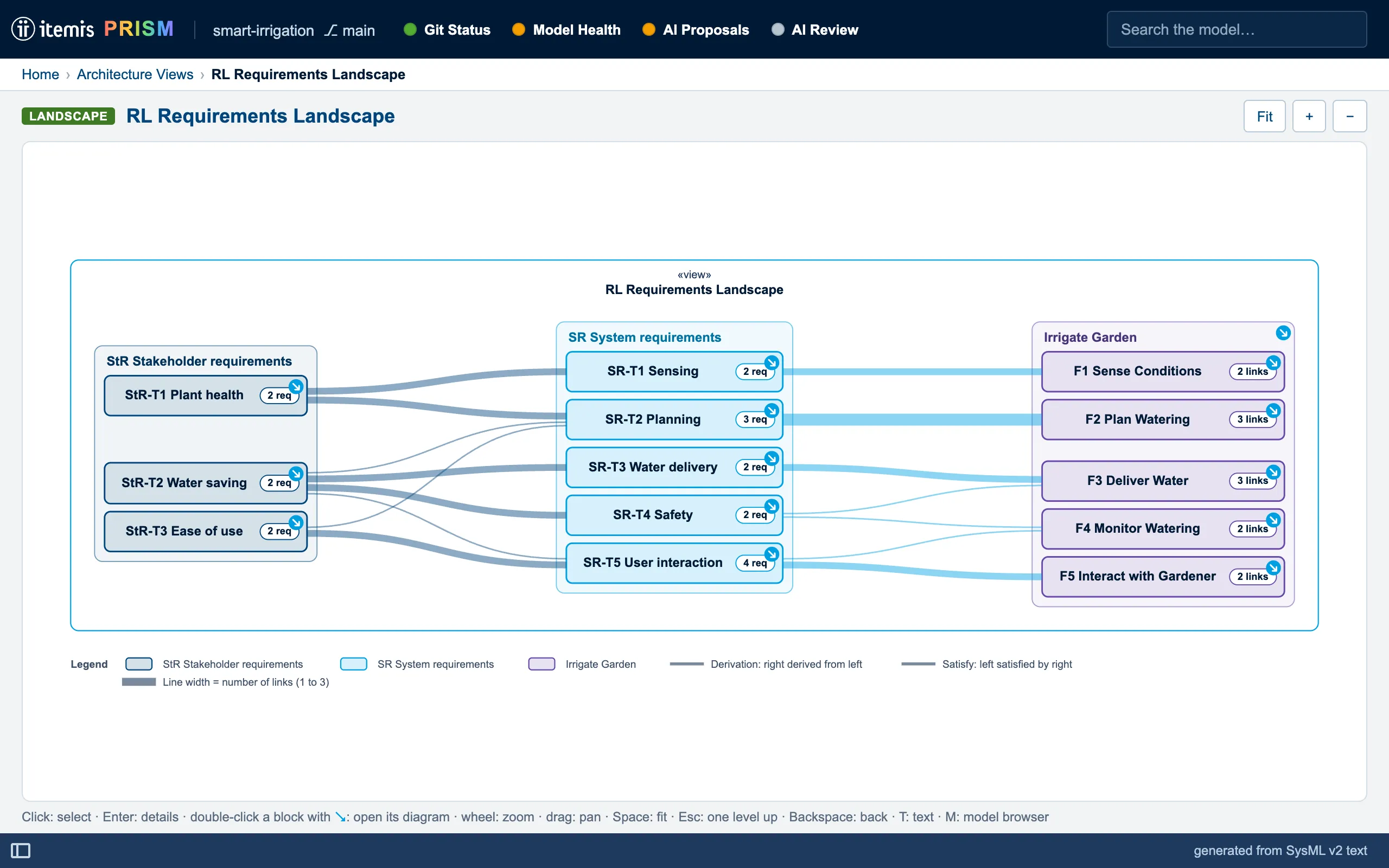
The requirement explorer shows what a requirement is derived from, which function satisfies it and which part that function runs on. Gaps are flagged, open points sit right next to it, the SysML text is one key away.
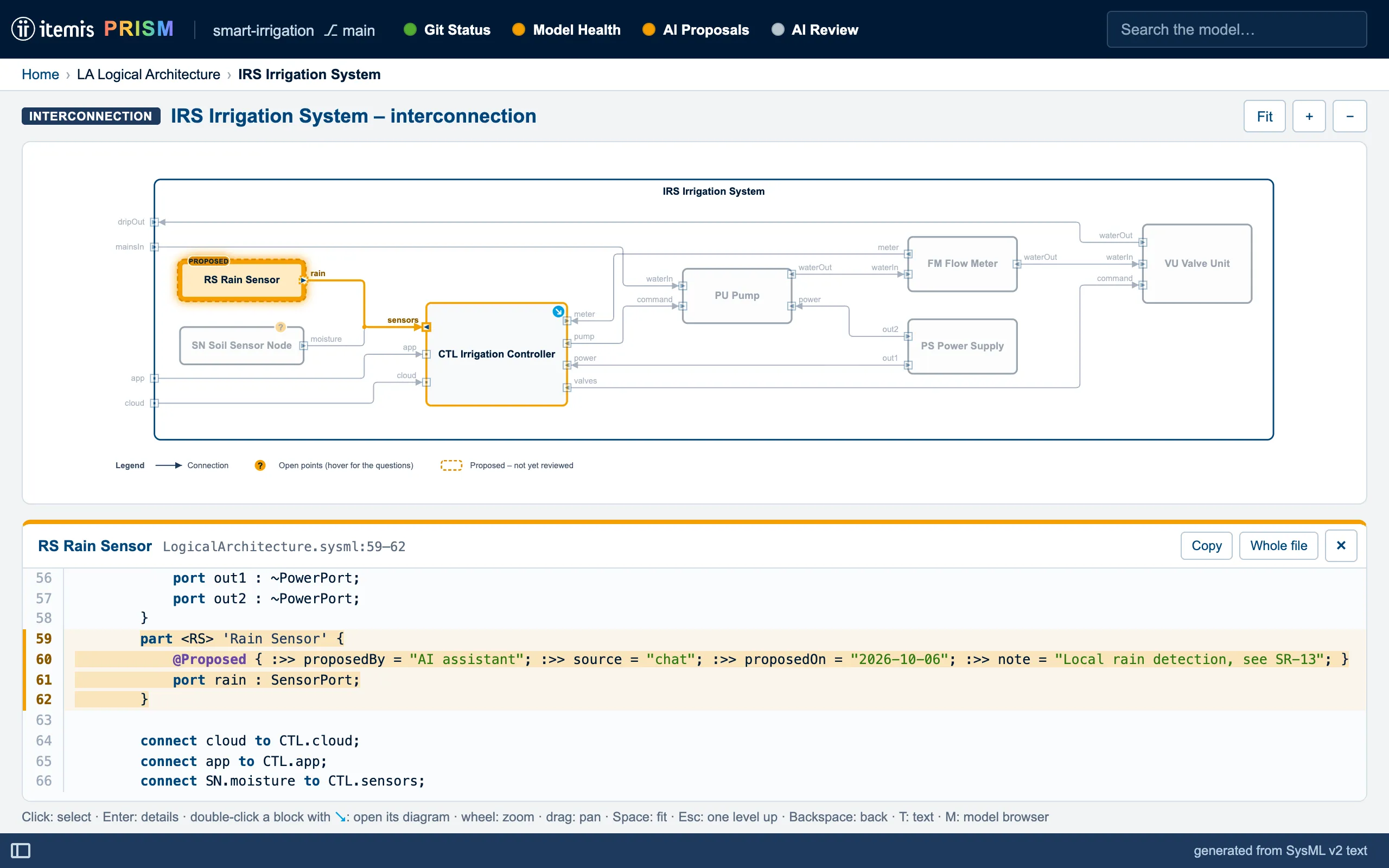
The AI assistant proposes changes as a text diff. New elements carry a @Proposed marking in the model and show dashed orange in every diagram until a person approves them.
Capabilities
One model as the single source – diagrams, checks, exports and AI access are derived from it.
Action flow, interconnection, allocation, trace, landscape and system context are generated. No drawing is maintained on its own.
Your architecture is text in Git – with branches, diffs, merge requests and CI checks, just like software. PRISM itself never pushes.
Views open in the browser – as a static website or as one HTML file you can email to a supplier, cut down to one stakeholder if you like.
The chat knows the open diagram and the selected element: “Which requirements does this block satisfy?” It highlights the answer right in the diagram.
Connect ports and allocate functions in the diagram, change values in the details panel, edit the text. PRISM changes only the affected spot – formatting and comments stay.
Deterministic rules on every change: untraced requirements, unallocated functions, open ports, mismatching flow types. In CI as well, with prism check.
Unresolved questions are metadata on the affected element, with priority, owner and decision – visible in the diagram, the explorer and their own overview.
PRISM brings no methodology of its own. A project profile maps your metadata to its roles, MODELING.md records your conventions for people and AI.
Today PRISM runs locally. Planned: operation by itemis and installation in your own infrastructure.
Trust
PRISM comes from itemis AG in Dortmund, specialists in model-based development. Your model stays standard SysML v2 text on your machine and in your repository.
 Information security
itemis AG is certified to ISO/IEC 27001: information security is an audited process with us.
 Quality management
Development and projects at itemis AG follow a certified quality management system.
PRISM runs locally and listens on 127.0.0.1 only. Without the chat nothing leaves your machine; with it, only what the assistant reads goes to the provider you chose.
Standard SysML v2 — PRISM writes only standard constructs, also for open points and review markings.
Every AI change checked — before writing: file unchanged, no new errors. Undo at any time, commits only on click.
Keys stay protected — API keys live in the system keychain and never reach the browser.
Limited access — PRISM reads and writes only inside the model folder, and only model files and its own files under .prism/.
No lock-in — your exchange format is the text in Git; layout and profile sit in separate files next to it.
FAQ
That is up to you. You can keep maintaining your model in your current tool, or have an AI assistant generate it, and make the SysML v2 code visible in PRISM. Or you can set up a new model directly in PRISM and work only there. Because PRISM keeps the text and the diagrams in sync at all times, you edit the model whichever way suits the task: in the code or graphically in the diagram.
PRISM runs on your machine. Without the chat, nothing leaves it. When you use the AI assistant, what it reads – names, documentation, requirement texts, the open diagram – goes to the AI provider you chose, under that provider’s terms. For customer models, check the customer contract first.
The assistant proposes; by default nothing is written until you click “Confirm”. Before writing, PRISM checks that the file is unchanged and that no new errors appear, and every change can be undone. New elements stay marked “Proposed” in the model until a person approves them, and commits always take a click.
Every change – from the diagram, the text editor or the AI assistant – is checked before it is saved. If it would make the model invalid, it is rejected and you see exactly what is wrong. The same checks can run automatically on every push.
No. Without a profile, neutral rules apply. If your project uses metadata such as «SystemFunction» or «unit», a project profile maps it to PRISM’s display roles. With prism new you carry the structure and conventions of an existing project over to a new one.
Low. If your model already exists as SysML v2 text, choose its folder or Git repository in the browser – PRISM shows all views right away. Without PRISM settings it starts with sensible defaults. PRISM runs locally on your machine and is tested on Windows and macOS alike.
PRISM is an MVP in development. It is tested with the public OMG example models and a reference model of about 7,400 lines. There is no official release, no hosted version and no support process yet, and file formats may still change. That is why we start with demos and pilot projects.
The licence model is not settled yet. AI usage runs through your own account with the AI provider. For a pilot project, just get in touch.
In a demo we show PRISM on an example model or on a slice of your own SysML v2 model. No commitment, nothing to install on your side.
