Changing the model
Save and share your changes
See what you changed, commit it to Git with a message, discard what you do not want, and exchange commits with the shared repository – from inside PRISM.
A PRISM project lives in a Git repository. Your changes in the Edit mode, in the project settings and from the chat are written to the files at once, but they are only kept for good, and seen by others, after you commit them. PRISM never commits by itself.
See whether something is not committed yet
The Git Status sits at the top of every page, next to Project: it shows the project and the branch, for example coffee-machine · main. Its light turns amber while files are changed and not committed; hover over it to see which.
Click the Git Status to open the commit dialog. In the Edit mode, Commit (n) opens the same dialog, and a change the chat wrote has Commit now… under it.
Commit your changes
The dialog Commit model changes says on which branch it commits and lists every changed file with its changes: model files and the files that keep the arrangement of your diagrams.
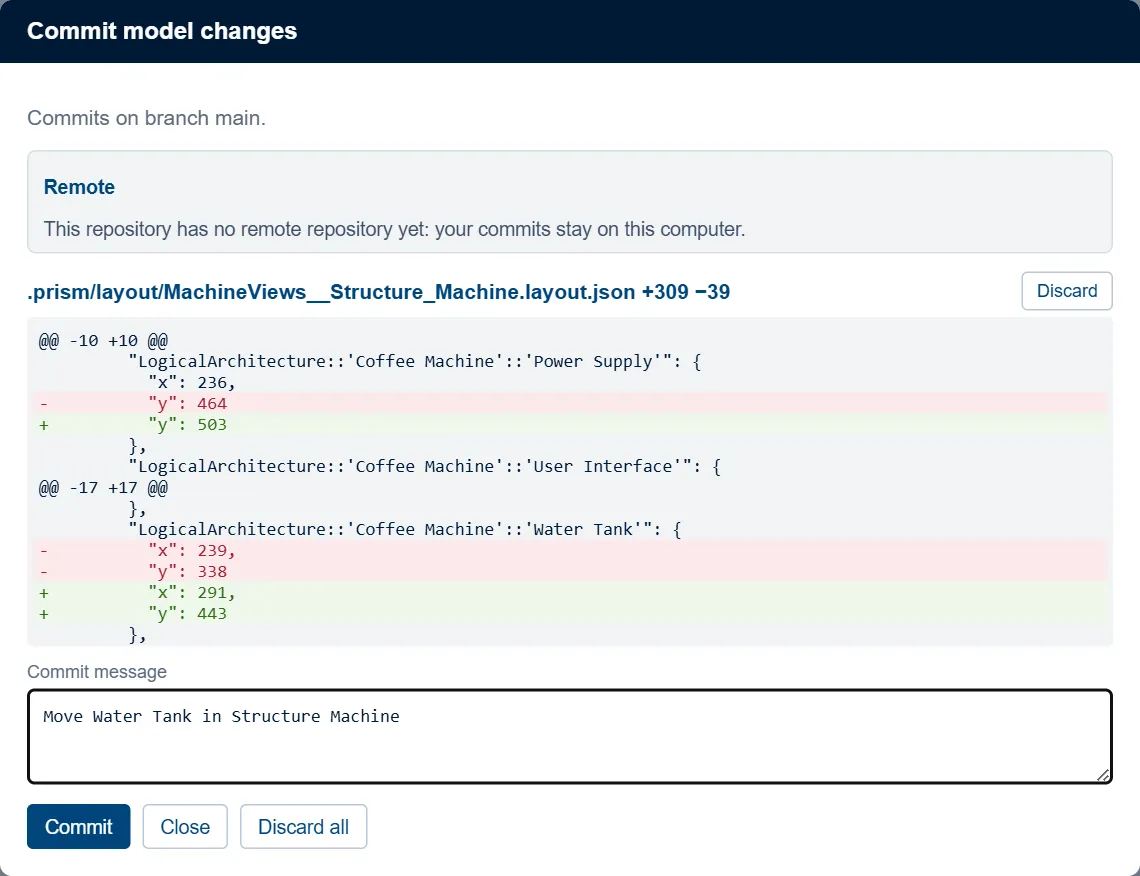
- Read the list. PRISM proposes a Commit message from your steps, for example Move Water Tank in Structure Machine. Change it to say what changed and why.
- Click Commit. PRISM checks the model first: when the files would give it new errors, nothing is committed and the dialog says what to fix.
A commit ends the undo history: what is committed stays, and older states are kept in the history of the repository.
Throw away a change
In the commit dialog, click Discard next to a file, or Discard all. PRISM asks once more in the dialog; then the file goes back to its state at the last commit. This cannot be undone, and the undo steps of those files are gone.
Get the changes of others and send yours
When the project has a shared repository, the section Remote of the commit dialog shows how your branch stands against it, for example 2 to push, 1 to pull, and when it was last checked.
- Fetch checks the shared repository for new commits. It changes nothing on your computer.
- Pull takes over the new commits of others.
- Push sends your commits. Right after a commit, the dialog offers to push it at once.
PRISM uses the access to the shared repository that is already set up on your computer; it never asks for a password. Without access it says so.
The coffee machine example has no shared repository: the section Remote says “This repository has no remote repository yet: your commits stay on this computer”, and there are no buttons.
When someone else changed the project
When PRISM starts, it checks the shared repository once. If there are new commits, the first page asks whether to pull them before you start: Pull or Not now. If the project is up to date, you see nothing.
Pull only takes over commits when nothing is in the way:
- While you have changes that are not committed, PRISM asks you to commit or discard them first.
- When both you and someone else made new commits, PRISM changes nothing and says so: your commits stay on your computer. Ask someone who works with Git to combine the two.
PRISM never merges and never overwrites the shared repository: a push is never forced.
When files were changed outside PRISM
If files of the model were changed by another program and are not committed, PRISM tells you when a page opens or when you come back to its window: a commit made in PRISM would contain them too. Choose Commit them first to commit them on their own, or Continue.