Reading the model
Issues
See everything in the model that waits for a person, from rule checks and AI proposals to open questions, and act on it.
PRISM keeps one list of everything in the model that waits for a person: findings of its rule checks, content an AI proposed, and open questions. You see the counts on every page and work through them on the Issues page.
Read the colours
Issues are counted in three colours, everywhere in PRISM:
- red: an error, or an open point of priority 1;
- amber: a warning, or priority 2;
- green: a note, or priority 3.
See the counts in the header
The Issues button in the header of every page shows the counts as red, amber and green numbers. Click it for a short overview in three groups:
- Rule Checks, with the number of Errors, Warnings and Notes;
- AI Proposals to approve, with what the AI Review and AI edits proposed, and Run AI Review…;
- Open Points, by priority.
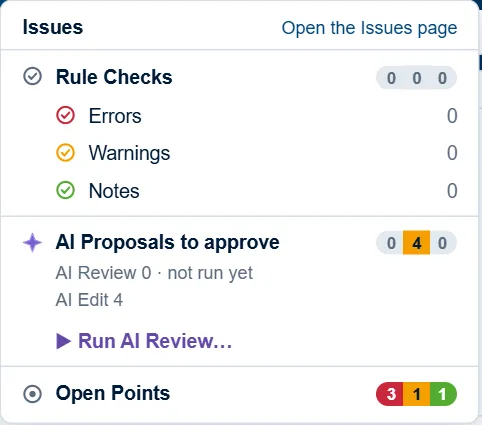
Click Open the Issues page to go to the page. The key I opens it from anywhere.
Find your way on the Issues page
The Issues page has three columns, side by side: Rule Checks, AI Proposals and Open Points.
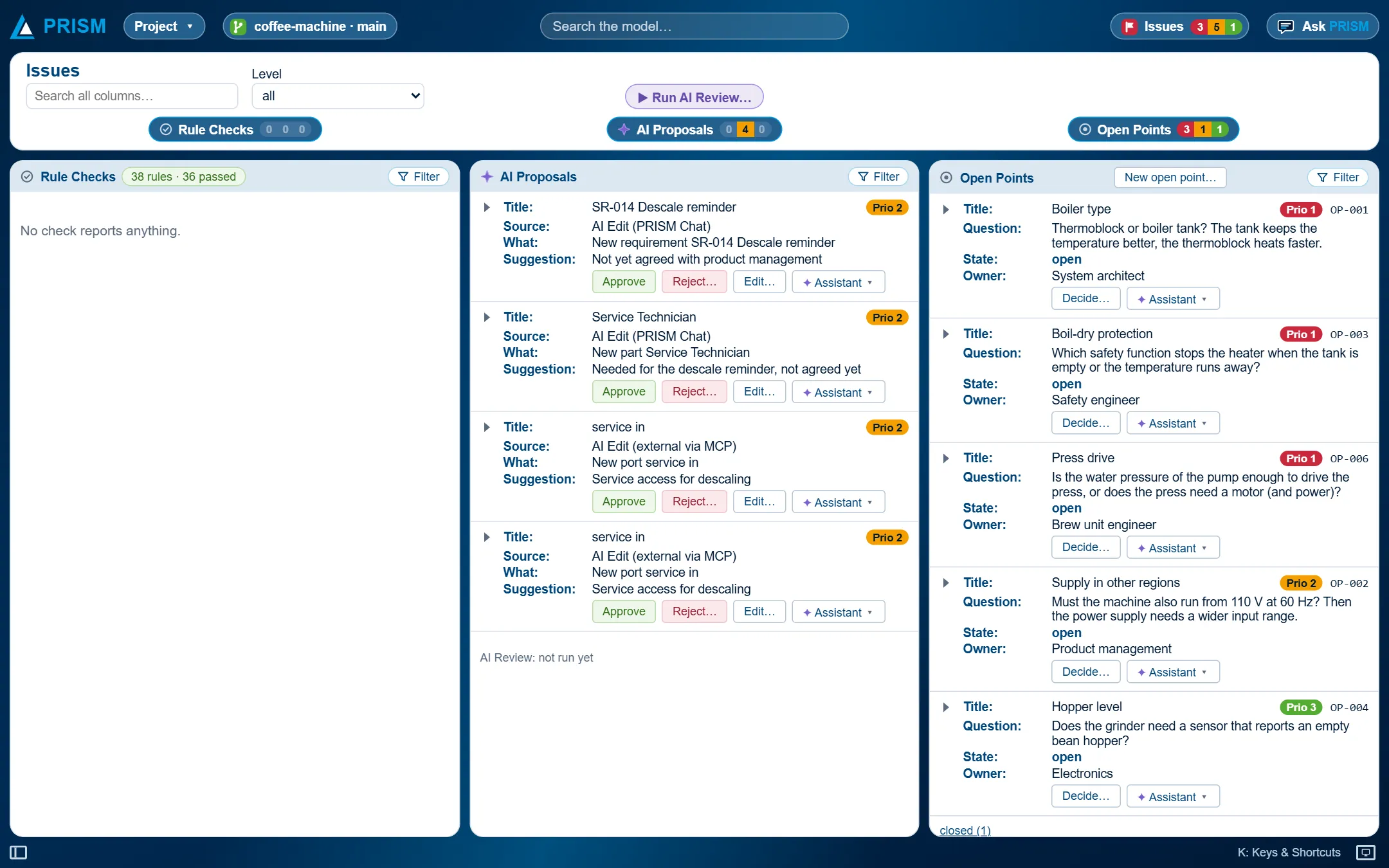
- The three buttons at the top, with their counts, show or hide a column.
- Search all columns… searches every column at once; Level limits the list to one level, for example the Brew Unit.
- Filter in the head of a column filters by its fields.
- The arrow at the start of a row opens its details: About links the elements it is about, and Shown in links the views that show them. A click opens the view with the element selected.
Each row starts with its name and its weight on the right, for example Warning or Prio 1.
Fix a rule check finding
PRISM checks the model against a set of rules every time it changes, for example that every requirement is realized or that every function is allocated. Each finding in Rule Checks has three lines: Rule (what is checked), Finding (what is wrong, with a link to the element) and Fix (how to resolve it).
In the coffee machine the column says No check reports anything. When a rule finds something, for example the warning Requirements without trace for a requirement that nothing realizes and from which no requirement is derived, click the element to go there. The button with the number of rules in the head of the column lists every rule with its explanation, including the ones that passed. Methodology modules add rules of their own; each finding of Violations of the model rules has its own weight and names its model rule after the colon (see Modules).
Review AI proposals
Anything an AI adds to the model is marked as proposed until a person approves it. The column AI Proposals lists every such element, with Source (how it came in, for example AI Edit (PRISM Chat)), What and Suggestion. The coffee machine has four: SR-014 Descale reminder, the Service Technician and two ports service in.
- Approve removes the marking. A short confirmation first lists everything that will be approved.
- Reject… deletes the proposed element. PRISM first shows what would be deleted with it.
- Edit… opens the element so you can change it first.
- ✦ Assistant ▾ offers requests to the assistant about this proposal.
Every approve and reject can be undone, and nothing is committed until you commit it. The full story, including Approve diagram on a diagram page: Proposed content.
Run AI Review… at the top of the page lets the AI go through the model area by area and propose improvements. It asks for confirmation first, with an estimate of the effort. Its findings are only proposals: they are never written into the model. For each, choose Take over as Open Point… to record it as an open point, or Reject… with a reason so it is not proposed again. The AI Review needs an AI provider; see Ask PRISM.
Decide an open point
Open points are questions the team still has to answer, recorded in the model next to the elements they are about. Each row in Open Points shows Title, Question, State and Owner, with its priority and id, for example OP-001 Boiler type: thermoblock or boiler tank? In the diagrams the elements concerned carry an amber ?.
- Decide… opens a form for the state, the decision and the owner. Saving writes the decision into the model, as a change you can undo.
- Reopen opens a closed point again.
- New open point… in the head of the column records a new question.
- closed (n) at the end of the list shows the points that are already decided.
Deciding records the decision only; it does not change the elements it is about. After you close a point, PRISM offers Carry the decision into the model: the chat opens with a request you can edit before you send it. By default you confirm each change the assistant proposes, what it adds is marked as proposed until someone approves it, and every change can be undone.