Reading the model
The requirement view
Look at one requirement at a time, see where it comes from and what is derived from it, find the gaps, and follow it to the functions and parts that realize it.
The requirement view shows all requirements of the project on one page. Pick one and you see its whole story: the requirements above it, the ones derived from it, and the functions and parts that realize it. Use it to check coverage before a review or to answer “why is this here?”.
Open the requirement view
- On the home page, open the card Requirements and click the tile Requirements Traceability.
- Or click the requirement count under the System Overview, for example 27 requirements: the view opens with the requirements of that level.
- Or select a requirement in any diagram, open the details panel (Enter) and click Open in requirement view ›.
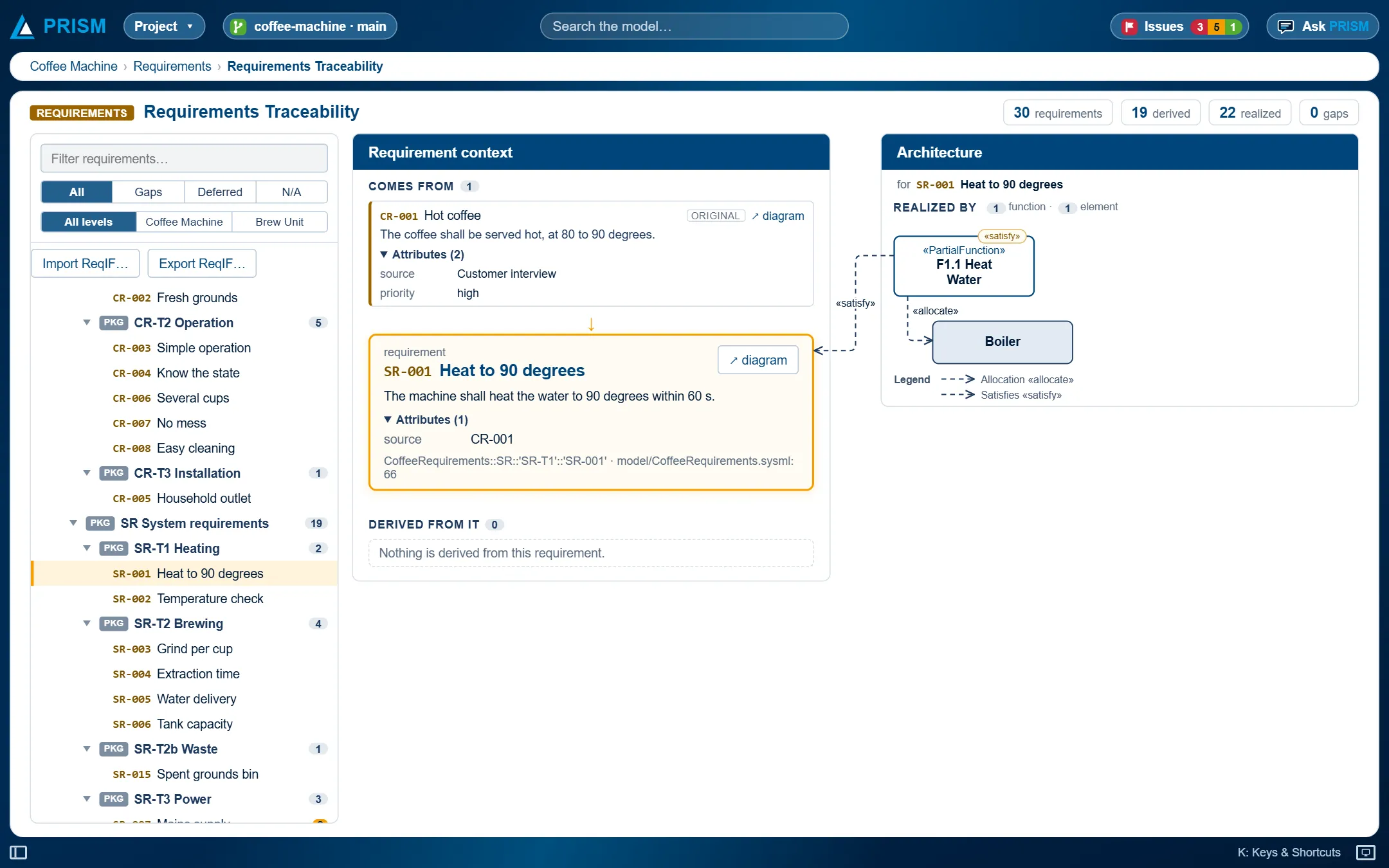
The head of the page counts the requirements, how many are derived, how many are realized and how many are gaps.
Find a requirement in the list
The list on the left holds every requirement, grouped by level and package: in the coffee machine CR Customer requirements and SR System requirements under Coffee Machine, and the requirements of the Brew Unit below.
- Type in Filter requirements… to narrow the list.
- All levels, Coffee Machine and Brew Unit show the requirements of every level or of one.
- Click a requirement, or move through the list with the arrow keys.
Markers in the list tell you about a requirement at a glance: GAP, PROPOSED for content an AI proposed that nobody has approved yet, and an amber ? for open points.
See where a requirement comes from
Select a requirement. The middle column, Requirement context, shows it as a card with its text and attributes, outlined in orange:
- Comes from lists the requirements it is derived from, up to the top. The top one is marked ORIGINAL. For SR-001 Heat to 90 degrees this is CR-001 Hot coffee.
- Derived from it lists the requirements derived from it, as an open tree you can collapse. When there are none, it says so.
- The last line of the card names its qualified id and the file and line it is written in.
Click another card in this column to focus it: it turns orange and the right column shows what realizes that requirement. The chain stays as it is.
Follow a requirement to its functions and parts
The right column, Architecture, draws what realizes the selected requirement, in the style of the diagrams. Realized by counts the functions and elements.
- Each function that satisfies the requirement is a box, with its kind above its name, for example «PartialFunction» F1.1 Heat Water.
- Below it, joined by a dashed «allocate» arrow, is the part it is allocated to: the Boiler.
- An element that satisfies the requirement directly is tagged «satisfy».
- When nothing realizes the requirement, the column says No function satisfies this requirement yet.
Click a box to open a diagram that shows that function or part. ↗ diagram on a requirement card opens a diagram that shows the requirement.
Find the gaps
A requirement is a gap when nothing realizes it and no other requirement is derived from it. Click Gaps above the list to see only these.
In the coffee machine there is none: the head of the view shows 0 gaps. SR-014 Descale reminder shows only PROPOSED: an AI proposed it and nobody has approved it yet, but F2.1 Remind to Descale satisfies it. A gap would also be listed on the Issues page under its rule checks.
Requirements that are not applicable or deferred
Not every requirement has to be realized in this model. PRISM knows two kinds that are not counted as gaps:
- N/A: deliberately out of scope. It is shown in grey with its rationale, who is responsible and the decision.
- DEFERRED: it belongs to a part of the system that is not modelled yet. The marker names that subsystem, for example DEFERRED · CONVEYOR, and the card shows the subsystem and the rationale.
The buttons Deferred and N/A above the list show only these. When something realizes such a requirement anyway, or an applicable requirement is derived from a not applicable one, PRISM flags it as ⚠ inconsistent.
Both markings are set in the model text. The coffee machine example has none: there the two buttons show No deferred requirements. and No requirements marked not applicable.